If you are unable to sign in to either Dimplex Control / ConfigR / Capa Connect apps using your usual credentials, it may be due to a security upgrade we have made earlier in 2025.
If you used a phone number as your login ID for your account, we have improved account security by disabling login by phone number. When your account was set up, you would have also provided an email address as a backup for the account.
Users who previously logged in via phone number can still regain access using the recovery email address they provided during sign-up. They will need to re-register using that same email.
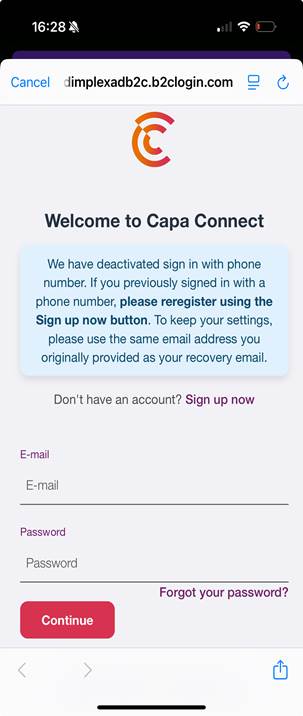
We have updated the login screen to inform users of this change with the following text. If you are unable to login using your email address and the password you had set up, use the "Sign up now" link on the page below and create an account using your backup email address and set a new password. Once registered, your existing hub and heater setup will then appear in the app.
Require additional help? Please follow link below
https://glendimplexservice.freshdesk.com/a/solutions/articles/79000136321
Was this article helpful?
That’s Great!
Thank you for your feedback
Sorry! We couldn't be helpful
Thank you for your feedback
Feedback sent
We appreciate your effort and will try to fix the article